If you already have a Jalwa Game account and want to access your dashboard, wallet, and games, logging in is the first step.
The login process is simple, but it’s important to follow the correct method to keep your account secure.
In this detailed guide, we’ll explain how to log in to Jalwa Game, how to fix common login issues, and how to protect your account from unauthorised access.
Why Proper Login Matters
Your Jalwa Game account contains your wallet balance, transaction history, bonuses, and personal details. Logging in correctly ensures that:
- Your account remains secure
- Your balance is protected
- You can access all features smoothly
- You avoid account lock or verification delays
If you’re still researching platform authenticity, read our full breakdown on Is Jalwa Game Real or Fake?.
Using the official website or app is always recommended to prevent security risks.
What You Need Before Logging In
Before starting the login process, make sure you have:
- Your registered mobile number
- Your correct login password
- A stable internet connection
If you forget your password, you can reset it using the “Forgot Password” option (explained below).
Step-by-Step Guide: How To Login On Jalwa Game
Follow these steps carefully to log in successfully:
Step 1: Open the Official Website or App
Launch the Jalwa Game app on your phone or open the official Jalwa Game website using your browser. Make sure you are on the correct platform and not a duplicate or fake site.
👉 If you haven’t installed the app yet, read our complete Jalwa Game App Download Guide With Installation Steps for safe installation instructions.
Step 2: Click on the “Login” Button
On the homepage, locate the account tab in the bottom menu. It will redirect you to the login page. However, to access the Jalwa Game login page directly, click the button below.
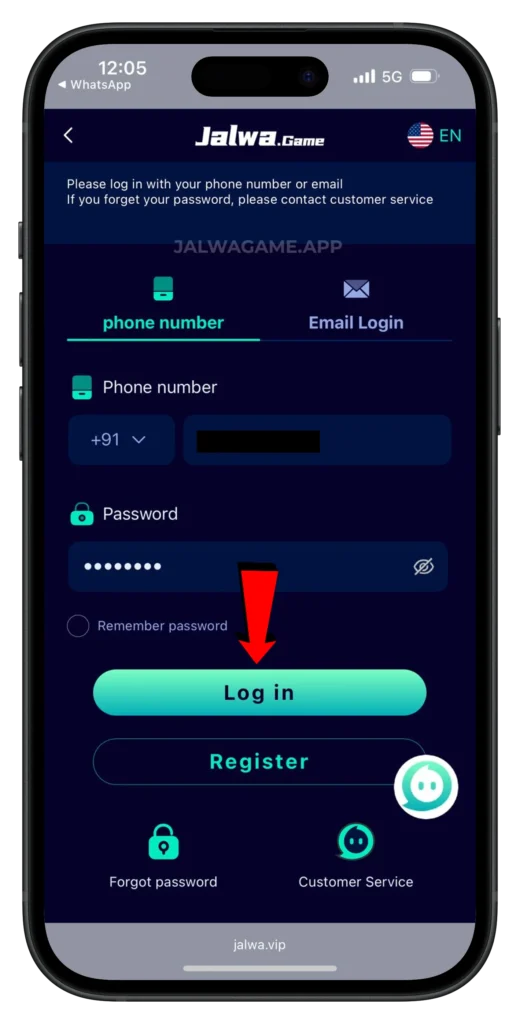
Step 3: Enter Your Registered Mobile Number
In the login form, type the mobile number you used during registration. Double-check the number to ensure accuracy.
Step 4: Enter Your Password
Next, enter your password exactly as created during registration. Passwords are case-sensitive, so pay attention to uppercase and lowercase letters.
Step 5: Tap on Login
After entering your details, click or tap the Login button. If your information is correct, you will be redirected to your Jalwa Game dashboard instantly.
If you don’t have an account yet, follow our complete guide on how to register on Jalwa Game before attempting to log in.
What Happens After Login?
Once logged in, you can:
- Access your wallet section
- Deposit or withdraw funds
- Explore available games
- Check bonuses and promotions
- Contact customer support
Your dashboard gives you complete control over your account activity.
To understand all available options, explore the complete All Games List in Jalwa Game, Complete Guide.
If you’re new to withdrawals, here’s a step-by-step guide on how to withdraw from Jalwa Game safely.
How To Reset Your Jalwa Game Password
If you forget your password, don’t worry. Follow these steps:
- Go to the login page.
- Click on the Forgot Password option below the login form.
- Enter your registered mobile number.
- Verify your identity using the OTP sent to your phone.
- Create a new password.
- Confirm the new password and log in again.
Make sure your new password is strong and secure.
Common Login Problems and Solutions
Here are some common issues users face while logging in and how to fix them:
1. Incorrect Password Error
Double-check spelling and capitalisation. If unsure, reset your password.
2. Account Not Found
Ensure you use the same mobile number you used during registration.
3. OTP Not Received
Check your network connection and wait a few minutes before requesting a new OTP.
4. Website Not Loading
Clear your browser cache or try opening the platform in a different browser.
5. Account Locked
If multiple incorrect login attempts are made, the system may temporarily lock your account to protect your security. Wait a few minutes and try again.
Security Tips For Safe Login
Keeping your Jalwa Game account secure is extremely important. Follow these tips:
- Never share your password with anyone
- Avoid logging in on public devices
- Do not save passwords on shared computers
- Use a strong and unique password
- Log out after using the platform on someone else’s device
You can also review our detailed article, “Is Jalwa Game Safe & Legal?” to understand the security and compliance aspects.
Be cautious of fake hack claims online. Read the truth in our guide on Is There A Jalwa Game Hack Truth, Risks & Reality.
Also, avoid clicking on suspicious login links sent through unknown messages or social media.
Logging In on Different Devices
You can log in to Jalwa Game from:
- Android mobile app
- Mobile browser
- Desktop browser
The process remains the same across devices: enter your registered number and password to access your account.
When to Contact Customer Support
If you cannot log in even after resetting your password, contact Jalwa Game customer support through the help section on the platform.
Provide accurate details about your issue so the team can assist you quickly.
Responsible Account Usage
After logging in, always monitor your activity regularly. Check your wallet transactions and bonus records to ensure everything is accurate. Responsible use of your account helps prevent misunderstandings or disputes.
Conclusion
Logging in to Jalwa Game is a quick and simple process when you follow the correct steps.
By using the official platform, entering accurate details, and protecting your password, you can access your account securely.
Whether you are checking bonuses, playing games, or managing your wallet, a secure login ensures a smooth experience.
Before getting fully involved, you may also want to review the complete Jalwa Game Pros and Cons.
Always stay alert, avoid unofficial links, and keep your credentials private to enjoy uninterrupted access to Jalwa Game.